


Page 500 - Divyank Tyagi
P. 500
466   |  ChaptER  11  Visualization


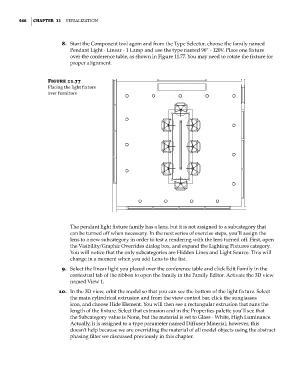
                             8.  Start the Component tool again and from the Type Selector, choose the family named
                                Pendant Light - Linear - 1 Lamp and use the type named 96” - 120V. Place one fixture
                                over the conference table, as shown in Figure 11.77. You may need to rotate the fixture for
                                proper alignment.


                        Figure 11.77
                        Placing the light fixture
                        over furniture


                                The pendant light fixture family has a lens, but it is not assigned to a subcategory that
                                can be turned off when necessary. In the next series of exercise steps, you’ll assign the
                                lens to a new subcategory in order to test a rendering with the lens turned off. First, open
                                the Visibility/Graphic Overrides dialog box, and expand the Lighting Fixtures category.
                                You will notice that the only subcategories are Hidden Lines and Light Source. This will
                                change in a moment when you add Lens to the list.
                             9.  Select the linear light you placed over the conference table and click Edit Family in the
                                contextual tab of the ribbon to open the family in the Family Editor. Activate the 3D view
                                named View 1.
                            10.  In the 3D view, orbit the model so that you can see the bottom of the light fixture. Select
                                the main cylindrical extrusion and from the view control bar, click the sunglasses
                                icon, and choose Hide Element. You will then see a rectangular extrusion that runs the
                                length of the fixture. Select that extrusion and in the Properties palette you’ll see that
                                the Subcategory value is None, but the material is set to Glass - White, High Luminance.
                                Actually, it is assigned to a type parameter named Diffuser Material; however, this
                                doesn’t help because we are overriding the material of all model objects using the abstract
                                phasing filter we discussed previously in this chapter.


          c11.indd   466                                                                             5/3/2014   11:07:36 AM

