


Page 14 - Computer Graphics Handout
P. 14
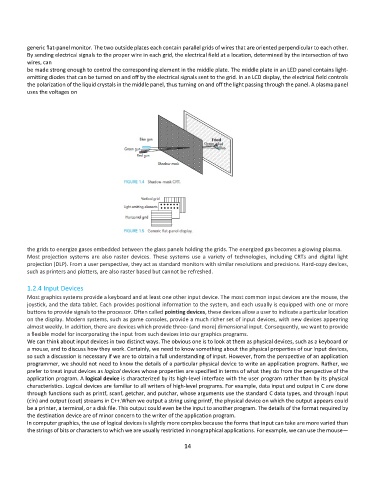
generic flat-panel monitor. The two outside plates each contain parallel grids of wires that are oriented perpendicular to each other.
          By sending electrical signals to the proper wire in each grid, the electrical field at a location, determined by the intersection of two
          wires, can
          be made strong enough to control the corresponding element in the middle plate. The middle plate in an LED panel contains light-
          emitting diodes that can be turned on and off by the electrical signals sent to the grid. In an LCD display, the electrical field controls
          the polarization of the liquid crystals in the middle panel, thus turning on and off the light passing through the panel. A plasma panel
          uses the voltages on


          the grids to energize gases embedded between the glass panels holding the grids. The energized gas becomes a glowing plasma.
          Most  projection  systems  are  also  raster  devices.  These  systems  use  a  variety  of  technologies,  including  CRTs  and  digital  light
          projection (DLP). From a user perspective, they act as standard monitors with similar resolutions and precisions. Hard-copy devices,
          such as printers and plotters, are also raster based but cannot be refreshed.

          1.2.4 Input Devices
          Most graphics systems provide a keyboard and at least one other input device. The most common input devices are the mouse, the
          joystick, and the data tablet. Each provides positional information to the system, and each usually is equipped with one or more
          buttons to provide signals to the processor. Often called pointing devices, these devices allow a user to indicate a particular location
          on the display. Modern systems, such as game consoles, provide a much richer set of input devices, with new devices appearing
          almost weekly. In addition, there are devices which provide three- (and more) dimensional input. Consequently, we want to provide
          a flexible model for incorporating the input from such devices into our graphics programs.
          We can think about input devices in two distinct ways. The obvious one is to look at them as physical devices, such as a keyboard or
          a mouse, and to discuss how they work. Certainly, we need to know something about the physical properties of our input devices,
          so such a discussion is necessary if we are to obtain a full understanding of input. However, from the perspective of an application
          programmer, we should not need to know the details of a particular physical device to write an application program. Rather, we
          prefer to treat input devices as logical devices whose properties are specified in terms of what they do from the perspective of the
          application program. A logical device is characterized by its high-level interface with the user program rather than by its physical
          characteristics. Logical devices are familiar to all writers of high-level programs. For example, data input and output in C are done
          through functions such as printf, scanf, getchar, and putchar, whose arguments use the standard C data types, and through input
          (cin) and output (cout) streams in C++.When we output a string using printf, the physical device on which the output appears could
          be a printer, a terminal, or a disk file. This output could even be the input to another program. The details of the format required by
          the destination device are of minor concern to the writer of the application program.
          In computer graphics, the use of logical devices is slightly more complex because the forms that input can take are more varied than
          the strings of bits or characters to which we are usually restricted in nongraphical applications. For example, we can use the mouse—

                                                              14

