


Page 13 - Computer Basics - Research
P. 13
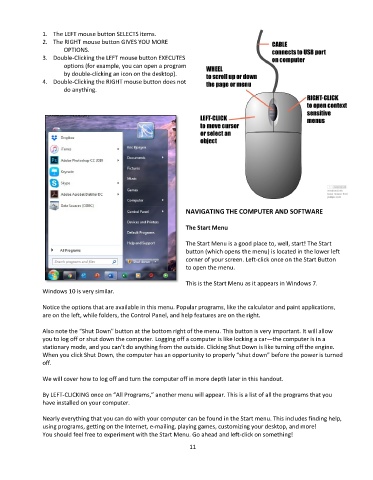
1.  The LEFT mouse button SELECTS items.
               2.  The RIGHT mouse button GIVES YOU MORE
                       OPTIONS.
               3.  Double-Clicking the LEFT mouse button EXECUTES
                       options (for example, you can open a program
                       by double-clicking an icon on the desktop).
               4.  Double-Clicking the RIGHT mouse button does not
                       do anything.


                                                                NAVIGATING THE COMPUTER AND SOFTWARE

                                                                The Start Menu

                                                                The Start Menu is a good place to, well, start! The Start
                                                                button (which opens the menu) is located in the lower left
                                                                corner of your screen. Left-click once on the Start Button
                                                                to open the menu.

                                                                This is the Start Menu as it appears in Windows 7.
               Windows 10 is very similar.

               Notice the options that are available in this menu. Popular programs, like the calculator and paint applications,
               are on the left, while folders, the Control Panel, and help features are on the right.

               Also note the “Shut Down” button at the bottom right of the menu. This button is very important. It will allow
               you to log off or shut down the computer. Logging off a computer is like locking a car—the computer is in a
               stationary mode, and you can’t do anything from the outside. Clicking Shut Down is like turning off the engine.
               When you click Shut Down, the computer has an opportunity to properly “shut down” before the power is turned
               off.

               We will cover how to log off and turn the computer off in more depth later in this handout.

               By LEFT-CLICKING once on “All Programs,” another menu will appear. This is a list of all the programs that you
               have installed on your computer.

               Nearly everything that you can do with your computer can be found in the Start menu. This includes finding help,
               using programs, getting on the Internet, e-mailing, playing games, customizing your desktop, and more!
               You should feel free to experiment with the Start Menu. Go ahead and left-click on something!
                                                                 11

