


Page 17 - Computer Basics - Research
P. 17
money to start up, but you never pay or own a license…you just keep paying indefinitely if you want to continue
               using the program.  If the version is updated with new features, you automatically receive all new updates.  Most
               of these programs operate partially through the internet via the cloud.  Therefore, to lease them, you must have
               a reliable and fast connection to the internet at least once every 30 days.

               If you look for a standalone version of the same software and look for a version perhaps before the present
               version, you may be able to purchase it for a fraction of the cost.  For example, Microsoft Office Home Edition
               2019 is available from multiple sources for as low as $40, and that includes Word, Excel, PowerPoint, Outlook,
               Access, Publisher, and Visio.   A subscription to Office 365 for the use of the same programs costs about $10 per
               month, or $120 per year, and you never pay it off.  So, in three months, you could have purchased Office 2019,
               which does about the same thing, but you own the license forever.

               The trend is clear: The tech world is moving toward cloud-based software (subscription-based), complete with all
               the pros and cons that such software brings. Normally, a cloud-based program operates considerably slower than
               a program installed on your hard drive.  Adobe, for instance, has moved most of its product line toward cloud-
               based offerings, with Adobe Creative Cloud and Adobe Document Cloud.  Office 365 is Microsoft’s move to the
               cloud with its Office suite.


               SHUTTING DOWN THE COMPUTER
               Logging Off vs. Shutting Down
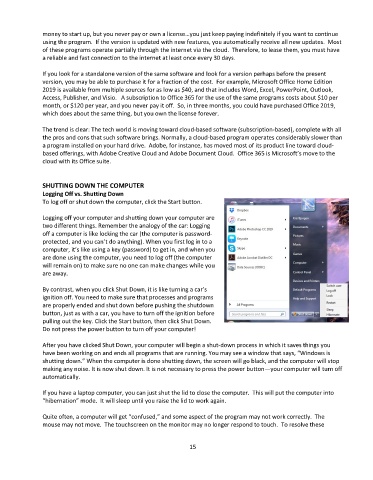
               To log off or shut down the computer, click the Start button.

               Logging off your computer and shutting down your computer are
               two different things. Remember the analogy of the car: Logging
               off a computer is like locking the car (the computer is password-
               protected, and you can’t do anything). When you first log in to a
               computer, it’s like using a key (password) to get in, and when you
               are done using the computer, you need to log off (the computer
               will remain on) to make sure no one can make changes while you
               are away.

               By contrast, when you click Shut Down, it is like turning a car’s
               ignition off. You need to make sure that processes and programs
               are properly ended and shut down before pushing the shutdown
               button, just as with a car, you have to turn off the ignition before
               pulling out the key. Click the Start button, then click Shut Down.
               Do not press the power button to turn off your computer!

               After you have clicked Shut Down, your computer will begin a shut-down process in which it saves things you
               have been working on and ends all programs that are running. You may see a window that says, “Windows is
               shutting down.” When the computer is done shutting down, the screen will go black, and the computer will stop
               making any noise. It is now shut down. It is not necessary to press the power button—your computer will turn off
               automatically.

               If you have a laptop computer, you can just shut the lid to close the computer.  This will put the computer into
               “hibernation” mode.  It will sleep until you raise the lid to work again.

               Quite often, a computer will get “confused,” and some aspect of the program may not work correctly.  The
               mouse may not move.  The touchscreen on the monitor may no longer respond to touch.  To resolve these


                                                                 15

