


Page 33 - Computer Basics - Research
P. 33
Printing
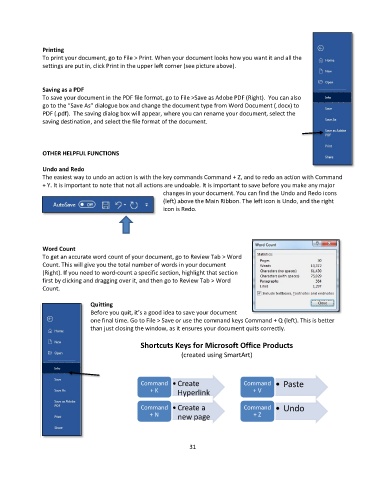
               To print your document, go to File > Print. When your document looks how you want it and all the
               settings are put in, click Print in the upper left corner (see picture above).


               Saving as a PDF
               To save your document in the PDF file format, go to File >Save as Adobe PDF (Right).  You can also
               go to the “Save As” dialogue box and change the document type from Word Document (.docx) to
               PDF (.pdf).  The saving dialog box will appear, where you can rename your document, select the
               saving destination, and select the file format of the document.


               OTHER HELPFUL FUNCTIONS

               Undo and Redo
               The easiest way to undo an action is with the key commands Command + Z, and to redo an action with Command
               + Y. It is important to note that not all actions are undoable. It is important to save before you make any major
                                                        changes in your document. You can find the Undo and Redo icons
                                                        (left) above the Main Ribbon. The left icon is Undo, and the right
                                                        icon is Redo.


               Word Count
               To get an accurate word count of your document, go to Review Tab > Word
               Count. This will give you the total number of words in your document
               (Right). If you need to word-count a specific section, highlight that section
               first by clicking and dragging over it, and then go to Review Tab > Word
               Count.

                                Quitting
                                Before you quit, it’s a good idea to save your document
                                one final time. Go to File > Save or use the command keys Command + Q (left). This is better
                                than just closing the window, as it ensures your document quits correctly.

                                                 Shortcuts Keys for Microsoft Office Products
                                                              (created using SmartArt)


                                                 Command   •Create                 Command    • Paste
                                                    + K
                                                                                       + V
                                                             Hyperlink

                                                 Command   •Create a               Command    • Undo
                                                    + N
                                                                                       + Z
                                                             new page


                                                                 31

