


Page 151 - Computer Graphics Handout
P. 151
Our first approach is to specify the position indirectly by applying a sequence of rotations and translations to the model-view matrix.
          This approach is a direct application of the instance transformation that we presented in Chapter 3, but we must be careful for two
                                                                                                            27
          reasons. First, we usually want to specify the camera’s position and orientation before we position any objects in the scene . Second,
          the order of transformations on the camera may appear to be backward from what you might expect.
          Consider an object centered at the origin. The camera is in its initial position, also at the origin, pointing down the negative z-axis.
          Suppose that we want an image of the faces of the object that point in the positive z-direction. We must move the camera away
          from the origin. If we allow the camera to remain pointing in the negative z-direction, then we want to move the camera backward
          along the positive z-axis, and the proper transformation is  where d is a positive number.


          Many people find it helpful to interpret this operation as moving the camera frame relative to the object frame. This point of view
          has a basis in classical viewing. In computer graphics, we usually think of objects as being positioned in a fixed frame, and it is the
          viewer who must move to the right position to achieve the desired view. In classical viewing, the viewer dominates. Conceptually,
          we do viewing by picking up the object, orienting it as desired, and bringing it to the desired location. One consequence of the
          classical approach is that distances are measured from the viewer to the object, rather than—as in most physically based systems—
          from the object to the viewer. Classical viewing often resulted in a left-handed camera frame. Early graphics systems followed the
          classical  approach  by  having  modeling  in  right-handed  coordinates  and  viewing  in  left-handed  coordinates—a  decision  that,
          although technically correct, caused confusion among users. When we are working in camera coordinates,
          we will measure distances from the camera, which is consistent with classical viewing.
          In  OpenGL,  the  internal  frames  are  right  handed.  Fortunately,  because  the  application  program  works  primarily  in  object
          coordinates, the application programmer usually does not see any of the internal representations and thus does not have to worry
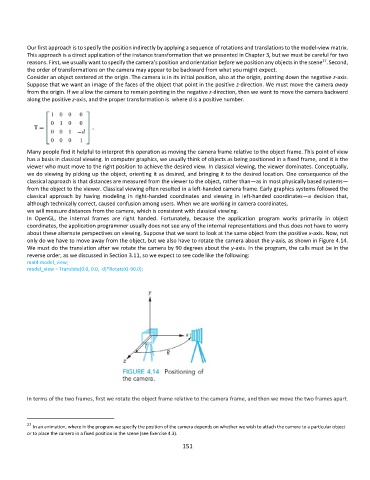
          about these alternate perspectives on viewing. Suppose that we want to look at the same object from the positive x-axis. Now, not
          only do we have to move away from the object, but we also have to rotate the camera about the y-axis, as shown in Figure 4.14.
          We must do the translation after we rotate the camera by 90 degrees about the y-axis. In the program, the calls must be in the
          reverse order, as we discussed in Section 3.11, so we expect to see code like the following:
          mat4 model_view;
          model_view = Translate(0.0, 0.0, -d)*RotateX(-90.0);


          In terms of the two frames, first we rotate the object frame relative to the camera frame, and then we move the two frames apart.


          27
            In an animation, where in the program we specify the position of the camera depends on whether we wish to attach the camera to a particular object
          or to place the camera in a fixed position in the scene (see Exercise 4.3).
                                                             151

