


Page 153 - Computer Graphics Handout
P. 153
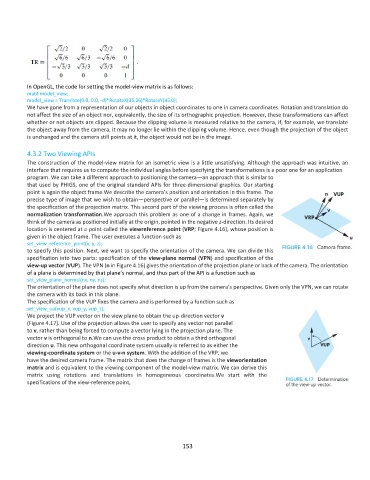
In OpenGL, the code for setting the model-view matrix is as follows:
          mat4 model_view;
          model_view = Translate(0.0, 0.0, -d)*RotateX(35.26)*RotateY(45.0);
          We have gone from a representation of our objects in object coordinates to one in camera coordinates. Rotation and translation do
          not affect the size of an object nor, equivalently, the size of its orthographic projection. However, these transformations can affect
          whether or not objects are clipped. Because the clipping volume is measured relative to the camera, if, for example, we translate
          the object away from the camera, it may no longer lie within the clipping volume. Hence, even though the projection of the object
          is unchanged and the camera still points at it, the object would not be in the image.

          4.3.2 Two Viewing APIs
          The construction of the model-view matrix for an isometric view is a little unsatisfying. Although the approach was intuitive, an
          interface that requires us to compute the individual angles before specifying the transformations is a poor one for an application
          program. We can take a different approach to positioning the camera—an approach that is similar to
          that used by PHIGS, one of the original standard APIs for three-dimensional graphics. Our starting
          point is again the object frame.We describe the camera’s position and orientation in this frame. The
          precise type of image that we wish to obtain—perspective or parallel—is determined separately by
          the specification of the projection matrix. This second part of the viewing process is often called the
          normalization transformation.We approach this problem as one of a change in frames. Again, we
          think of the camera as positioned initially at the origin, pointed in the negative z-direction. Its desired
          location is centered at a point called the viewreference point (VRP; Figure 4.16), whose position is
          given in the object frame. The user executes a function such as
          set_view_reference_point(x, y, z);
          to specify this position. Next, we want to specify the orientation of the camera. We can divide this
          specification into two parts: specification of the view-plane normal (VPN) and specification of the
          view-up vector (VUP). The VPN (n in Figure 4.16) gives the orientation of the projection plane or back of the camera. The orientation
          of a plane is determined by that plane’s normal, and thus part of the API is a function such as
          set_view_plane_normal(nx, ny, nz);
          The orientation of the plane does not specify what direction is up from the camera’s perspective. Given only the VPN, we can rotate
          the camera with its back in this plane.
          The specification of the VUP fixes the camera and is performed by a function such as
          set_view_up(vup_x, vup_y, vup_z);
          We project the VUP vector on the view plane to obtain the up-direction vector v
          (Figure 4.17). Use of the projection allows the user to specify any vector not parallel
          to v, rather than being forced to compute a vector lying in the projection plane. The
          vector v is orthogonal to n.We can use the cross product to obtain a third orthogonal
          direction u. This new orthogonal coordinate system usually is referred to as either the
          viewing-coordinate system or the u-v-n system. With the addition of the VRP, we
          have the desired camera frame. The matrix that does the change of frames is the vieworientation
          matrix and is equivalent to the viewing component of the model-view matrix. We can derive this
          matrix  using  rotations  and  translations  in  homogeneous  coordinates.We  start  with  the
          specifications of the view-reference point,


                                                             153

