


Page 26 - Computer Basics - Research
P. 26
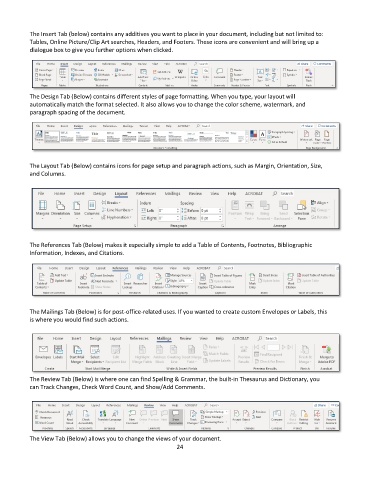
The Insert Tab (below) contains any additives you want to place in your document, including but not limited to:
           Tables, Online Picture/Clip Art searches, Headers, and Footers. These icons are convenient and will bring up a
           dialogue box to give you further options when clicked.


           The Design Tab (Below) contains different styles of page formatting. When you type, your layout will
           automatically match the format selected. It also allows you to change the color scheme, watermark, and
           paragraph spacing of the document.


           The Layout Tab (Below) contains icons for page setup and paragraph actions, such as Margin, Orientation, Size,
           and Columns.


           The References Tab (Below) makes it especially simple to add a Table of Contents, Footnotes, Bibliographic
           Information, Indexes, and Citations.


           The Mailings Tab (Below) is for post-office-related uses. If you wanted to create custom Envelopes or Labels, this
           is where you would find such actions.


           The Review Tab (Below) is where one can find Spelling & Grammar, the built-in Thesaurus and Dictionary, you
           can Track Changes, Check Word Count, and Show/Add Comments.


           The View Tab (Below) allows you to change the views of your document.
                                                             24

