


Page 25 - Computer Basics - Research
P. 25
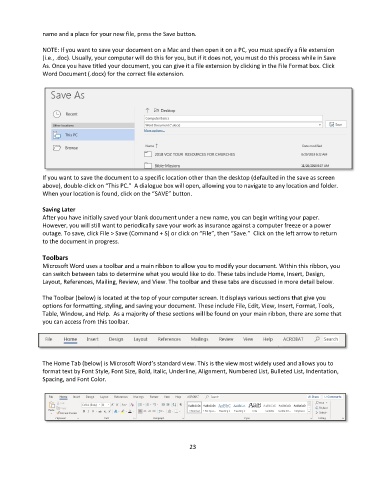
name and a place for your new file, press the Save button.

               NOTE: If you want to save your document on a Mac and then open it on a PC, you must specify a file extension
               (i.e., .doc). Usually, your computer will do this for you, but if it does not, you must do this process while in Save
               As. Once you have titled your document, you can give it a file extension by clicking in the File Format box. Click
               Word Document (.docx) for the correct file extension.


               If you want to save the document to a specific location other than the desktop (defaulted in the save as screen
               above), double-click on “This PC.”  A dialogue box will open, allowing you to navigate to any location and folder.
               When your location is found, click on the “SAVE” button.

               Saving Later
               After you have initially saved your blank document under a new name, you can begin writing your paper.
               However, you will still want to periodically save your work as insurance against a computer freeze or a power
               outage. To save, click File > Save (Command + S) or click on “File”, then “Save.”  Click on the left arrow to return
               to the document in progress.

               Toolbars
               Microsoft Word uses a toolbar and a main ribbon to allow you to modify your document. Within this ribbon, you
               can switch between tabs to determine what you would like to do. These tabs include Home, Insert, Design,
               Layout, References, Mailing, Review, and View. The toolbar and these tabs are discussed in more detail below.

               The Toolbar (below) is located at the top of your computer screen. It displays various sections that give you
               options for formatting, styling, and saving your document. These include File, Edit, View, Insert, Format, Tools,
               Table, Window, and Help.  As a majority of these sections will be found on your main ribbon, there are some that
               you can access from this toolbar.


               The Home Tab (below) is Microsoft Word’s standard view. This is the view most widely used and allows you to
               format text by Font Style, Font Size, Bold, Italic, Underline, Alignment, Numbered List, Bulleted List, Indentation,
               Spacing, and Font Color.


                                                                 23

